Shaun Jooste

Updated last month

Free video converter alternative

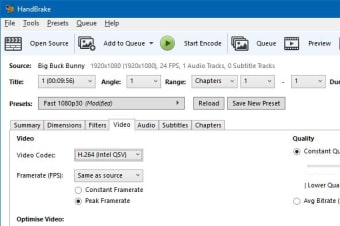
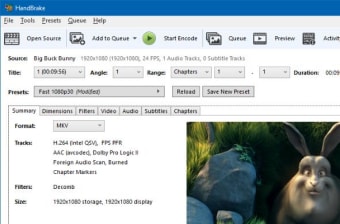
HandBrake is a free, open-source video converter for Windows, macOS, and Linux, known for its good format transformation capabilities. It supports multimedia formats like MP4 and MKV, ideal for sending media for various devices. Beyond conversion, it offers customization options like filters, cropping, and dimension adjustments, enhancing video quality and compatibility.

Convert your files with ease

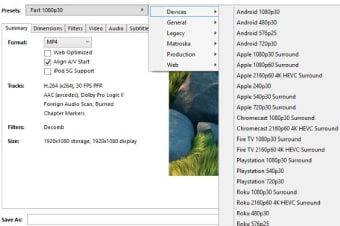
HandBrake streamlines video conversion with intuitive presets for quick, high-quality output. It supports custom profiles and efficient batch conversions, provided codecs are installed. Users can also add chapter markers and subtitles, enhancing the viewing experience. The encoding process is notably fast, minimizing user wait times for file transformation and conversion.

HandBrake, despite its power, has a learning curve for beginners due to its technical interface and lack of in-app tutorials. New users might struggle with advanced encoding settings and filters. However, experienced users or those utilizing online documentation will find unmatched control and flexibility, making it a preferred tool for video professionals.

Essential, but not for newbies

HandBrake’s powerful, free, open-source converter offers format support, fast encoding, and customization. It features intuitive presets and batch processing. However, its technical interface and lack of in-app tutorials create a steep learning curve for beginners, making it more suitable for experienced users or those who have a friend to help them.


Shaun Jooste

With extensive experience in gaming and creative writing, he has authored novels and contributed articles and reviews on the latest titles. His career spans both publishing and content creation, combining knowledge of storytelling with hands-on analysis of games and digital media.

  • Pros

    • Supports a wide range of file formats
    • Batch processing for multiple files
    • Chapter markers and subtitles
    • Cross-platform compatibility
  • Cons

    • Steep learning curve
    • Lacks in-app tutorials
    • Requires installation of certain codecs for specific features
 0/3

App specs

Also available in other platforms

Program available in other languages


User reviews about HandBrake

3.9

5 reviews

Add review

Main reviews for you

  • Anonymous user

    It's a good software for reducing file sizes, but I'm disappointed that it's more NTSC that PAL format. I wanted to covert my file sizes to Fast 1080p25 and it only has Fast 1080p30. The next preset is Very Fast 576p25 which is not good enough for me since I'm in a PAL Region.I hope you will take this into consideration.Believe you me, it is a good software.

  • Anonymous user

    It is so good and help to reduce a bulky video and so that the storage and upload time is not big issues

  • Anonymous user

    Worked flawlessly for me till recently.. Updated to the latest version recently, but since then some DVD output files are broken up into a mosaic pattern with broken sound. Grateful for a fix!

  • Anonymous user

    HandBrake is a fantastic video converter of all time!!!. HanBrake is a fantastic free tool MPEG-converter for any kind of which is really fantastic. All my headache have been resolved with HanBrake.Besides it is simple to use, fast converter, free,and with preset options. From now on I must not worry about video converter. Thanks to the developer and the beauty of Softonic.

  • Anonymous user

    Handbrake has performed flawlessly for me and it's Free!. Ok, it's better if you know a bit about what you're doing first, but with a bit of research and a bit of trial and error, I've been coming up with Great HD rips from Blu-Ray.It doesn't remove Copy Protection, however - you'll have to use another tool to do that. Pros: - Great Quality output- Every setting I could want Cons: - Could be a bit overwhelming if you're not experienced at ripping.

More

You may also like

Alternatives to HandBrake

Explore Apps

Related Articles

Latest articles

Laws concerning the use of this software vary from country to country. We do not encourage or condone the use of this program if it is in violation of these laws.